
Snow & ice
Run every storm from one screen
One app, all year: no second subscription in November. When the forecast reaches your trigger depth, GroundsQuote warns you. Start the storm and every snow job is put on its crew’s day in priority order, customers are told to move their cars, and each push is billed from the snowfall measured near the property.
On Pro and Business.
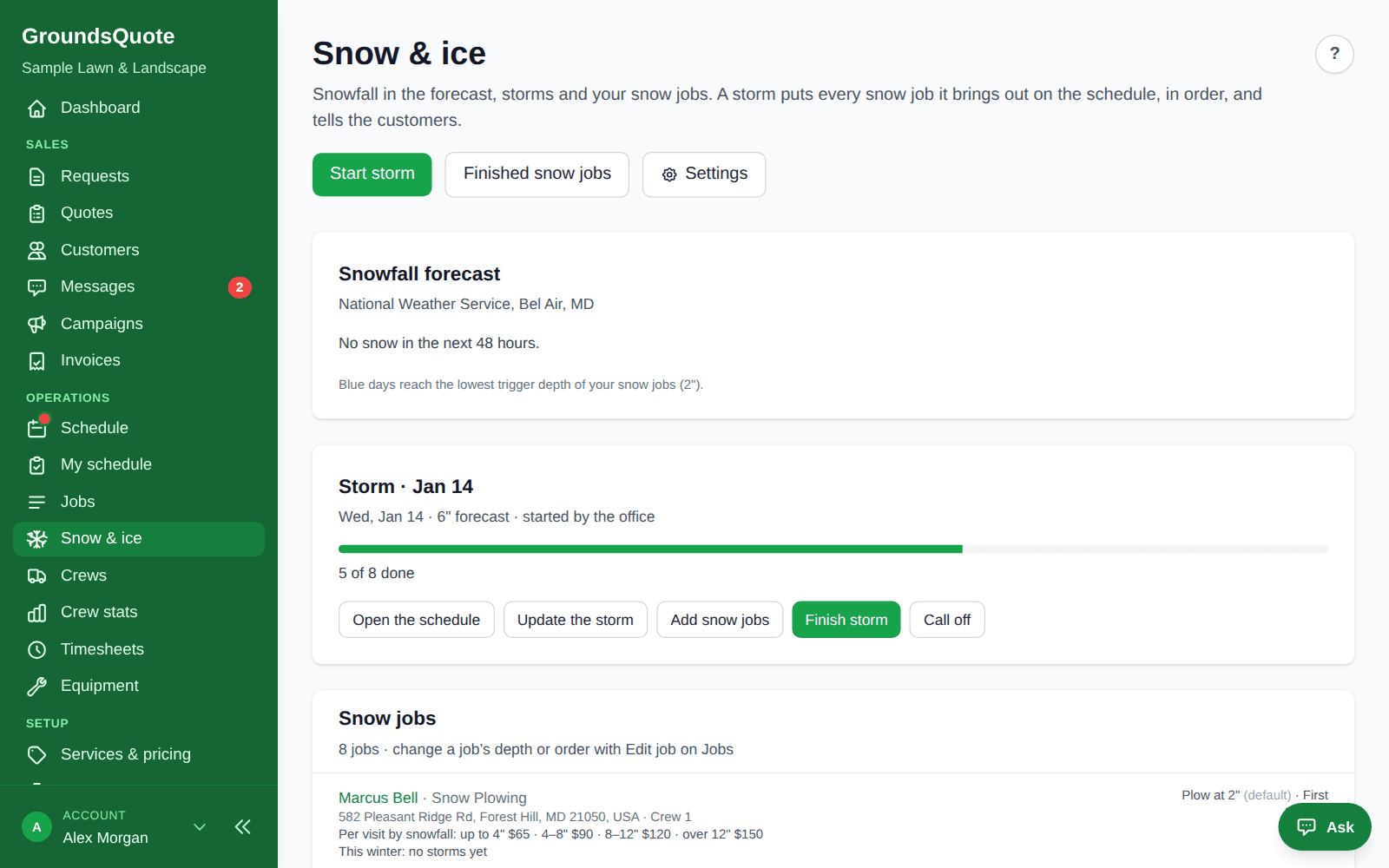
Storms from the forecast
An email when the snow forecast reaches your lowest trigger depth in the next 48 hours, or let storms start automatically.
Priority, deadlines, zero tolerance
Zero tolerance accounts first, then sites with a clear-by time (“open by 6am”), then by priority and driving order. The route optimizer keeps to the deadlines.
Several pushes per storm
Send crews out for a 2nd or 3rd push, for every job or only plowing, salting or walks. Bill every push, or one charge per storm however many pushes.
Billed from measured snowfall
Each push is priced from the snowfall measured at the weather station nearest the property, and the invoice line names the station.
Every way to price snow
By depth, by driveway length and depth, by lot size and walkways, flat, hourly, a seasonal contract (up front or monthly) or a year-round plan paid in equal monthly payments over the months you set.
Storm reports for every property
One page per property per storm: times, crew, where the phone was, weather, measured snowfall, materials and photos. Emailed and kept in the customer portal.
One app for the lawn season and the snow season
Snow customers, crews, equipment and invoices live in the same account as your lawn work, so a mowing customer becomes a snow customer with a quote, not a second login. Snow and ice stays out of sight until you switch it on and runs only inside the winter season you set.
- Year-round plans: one contract for lawn and snow, billed in equal monthly payments over the months you set
- Fall staking and spring stake removal jobs added for every snow property and placed on the schedule
- Plow damage reported by crews with photos, turned into a spring repair job or a repair offer
- Snow mode: starting a storm can move the day’s other jobs to the reschedule list, and the screens show snow work only
Pricing that fits residential and commercial work
Residential driveways are measured from the map when the request comes in, and priced by length and snowfall depth. Commercial sites get a site map instead.
- Commercial site maps: paved areas, walkways, snow pile zones and hazards (curbs, islands, drains, hydrants, fire lanes, no-plow areas)
- Paved areas measured on the map; tap a lot on the aerial photo to fill it, and add sidewalks found in OpenStreetMap
- Service level (zero tolerance or a trigger depth), open hours, an on-site contact and crew instructions, shown to the crew on the storm visit
- Per-push prices that follow the depth ranges you set, with your quote adjustments and rounding
The storm board on storm night
One screen with each crew’s stops done and left, how far behind it is, when it should finish and get back to the yard, sites that will miss their clear-by time, and stops with no crew.
- Crew positions on a map while My schedule is open on their phones
- “Can you work the storm?” push notifications to crews, with their answers on the board
- Readiness: materials at their low-stock level, open equipment problems and snow machines that are down
- Storm mode: the app turns winter blue for everyone while a storm is under way
Subcontractors, salt and storm profit
Subcontractors work as their own crew on free field logins. Each one gets an email with Yes / No buttons when a storm is coming, and a pay statement per storm calculated per push, per site or by the hour.
- Insurance certificates kept with an expiry warning 30 days ahead
- Salt and materials logged by the crew per visit, taken off your stock with a low-stock warning, and billed at your price
- Storm profit: what each storm billed against materials and subcontractor pay, and labor costs on Business
- Branches run their own storms, each from its own forecast
Customers told, and in control
A heads-up to move cars before the storm, an update if it grows and a “called off” notice if the storm does not come, by email and, with the text message add-on, by text. From their portal, customers can skip a storm or ask for a plow, and download their storm reports.
Questions
Where does the snowfall measurement come from?
From the daily snowfall reported by NOAA and CoCoRaHS observers at the station nearest each property, within 15 miles. Until a station reports, a finished push is billed at your lowest depth range and raised if more snow is measured. You can always set the depth yourself for a storm or a single job.
What happens when it snows again the next day?
Snow within 24 hours of a storm can be sent out as another push in the same storm, or started as a new storm. Jobs set to one charge per storm are billed once however many pushes they take.
Can I keep records for slip-and-fall claims?
Every storm visit records when it started and finished, who did it, where the phone was, the weather at start and finish, the measured snowfall, materials and photos. The storm report puts it on one page per property, as a PDF you can email or keep.
Can I track trucks with the app closed?
Not yet. Crew positions are shared while My schedule is open on a crew phone. Tracking in the background needs the phone store apps, which are planned.
Works hand in hand with
Invoicing & payments
Invoices built from finished visits, emailed with a PDF, paid online or by autopay.
Scheduling & routes
Recurring jobs from accepted quotes, crews, a drag-and-drop calendar and optimized routes.
Crew app & time tracking
The day on a phone: the next stop, navigation, checklists, photos and the clock, in English or Spanish.
Free forever plan, no card · 30-day free trial on paid plans · Cancel anytime
Run your whole season from one app
Start free with quotes that measure the lawn from the address. Add scheduling, crews and invoicing when you are ready.
Free forever plan, no card · 30-day free trial on paid plans · Cancel anytime