
For contractors serving businesses, HOAs and property managers
Commercial snow: measured sites, clear-by deadlines and a record of every visit
Map each parking lot, walkway and pile zone on the aerial photo, price it by paved area and walkway length, and clear the zero tolerance and open-by-6am sites first. Every push is billed from the snowfall measured near the site, and every visit is on record for the property manager and your insurer.
Free forever plan, no card · 30-day free trial on paid plans · Cancel anytime
Sound familiar?
- Measuring parking lots with a wheel or guessing from an old site plan
- Crews who do not know where to pile the snow or where the hydrants are
- A property manager asking for proof the lot was salted before 6am
- A slip-and-fall claim two years later and no record of the visit
- Subcontractors you cannot reach on storm night, and their pay calculated by hand
Sites measured on the map
Paved areas, walkways, snow pile zones and hazards drawn on the satellite map, with overlapping areas counted once.
Priced by lot size and walkways
A price per 1,000 sq ft of pavement and per foot of walkway, with a minimum and depth steps you set.
Deadlines that set the route
Zero tolerance accounts first, then sites with a clear-by time; the route optimizer keeps to them.
A storm report for every site
Times, crew, where the phone was, weather, measured snowfall, materials and photos, one page per site per storm.
What you get
Snow & ice
Run every storm from one screen
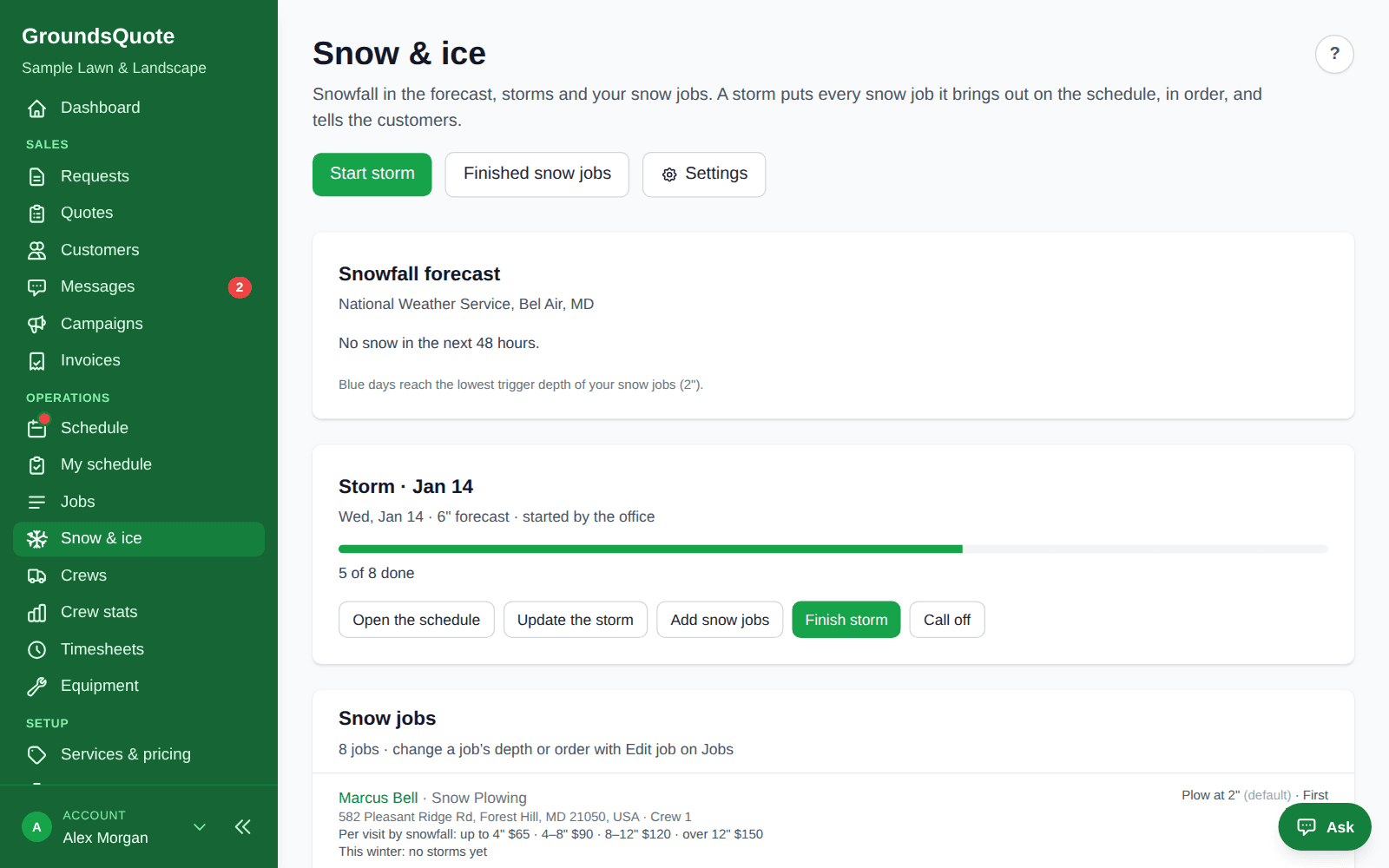
One app, all year: no second subscription in November. When the forecast reaches your trigger depth, GroundsQuote warns you. Start the storm and every snow job is put on its crew’s day in priority order, customers are told to move their cars, and each push is billed from the snowfall measured near the property.
- Storms from the forecast: An email when the snow forecast reaches your lowest trigger depth in the next 48 hours, or let storms start automatically.
- Priority, deadlines, zero tolerance: Zero tolerance accounts first, then sites with a clear-by time (“open by 6am”), then by priority and driving order. The route optimizer keeps to the deadlines.
- Several pushes per storm: Send crews out for a 2nd or 3rd push, for every job or only plowing, salting or walks. Bill every push, or one charge per storm however many passes.
Invoicing & payments
Invoices that build themselves from finished work
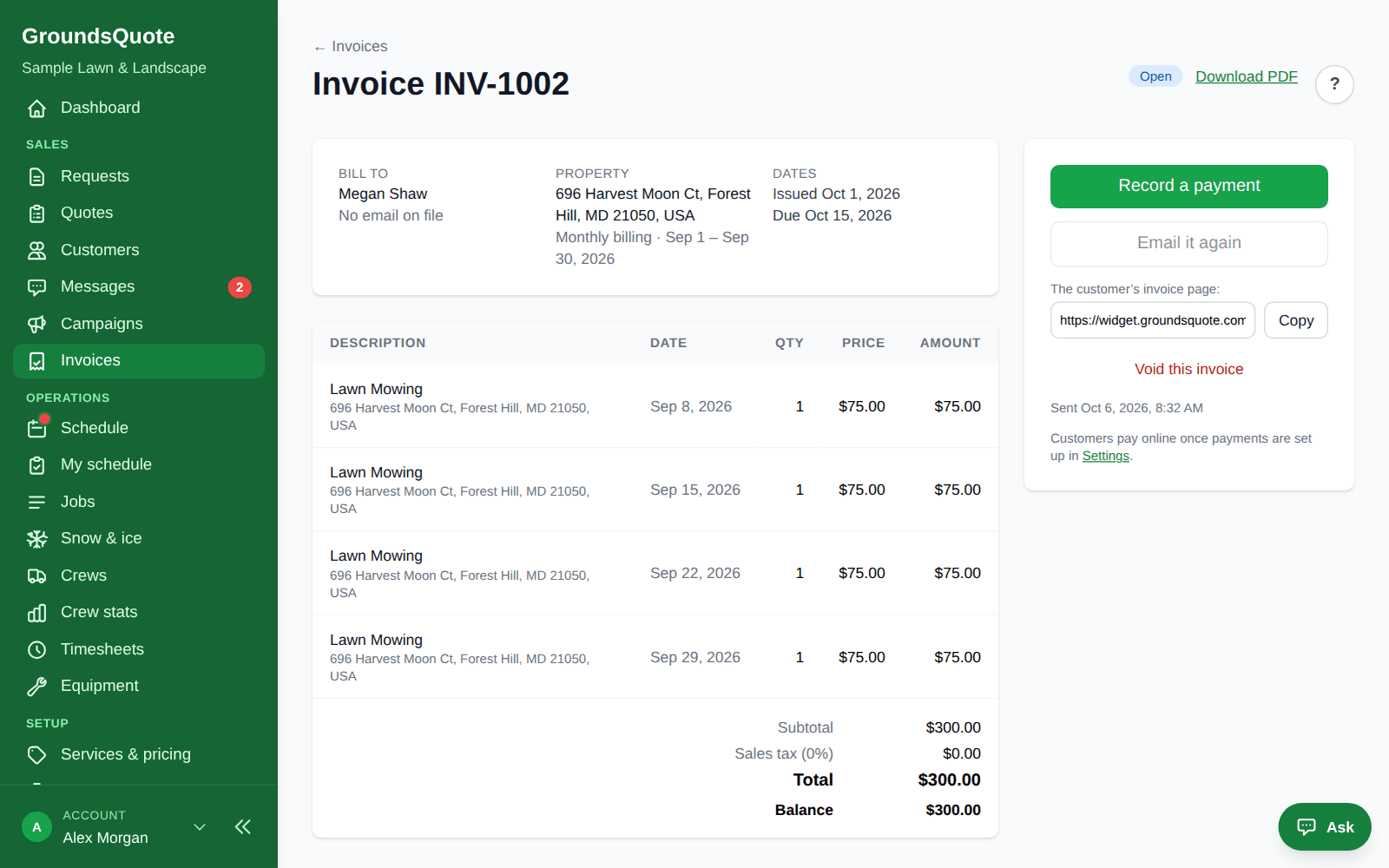
Every visit your crews finish is ready to bill. Invoice per visit or once a month, review the drafts or send them automatically, and let customers pay online or on autopay.
- From visits to invoices: Per visit, weekly, monthly, quarterly or yearly, in arrears for the visits done. Every morning, soon after each job (right away, 15 minutes or an hour), or when you press the button.
- Paid online: Card, Apple Pay, Google Pay or bank transfer on a Stripe-hosted page. Payouts go straight to your own Stripe account.
- Paid when the job is done: Turn on Charge when the job’s done: the crew finishes, the invoice goes out, the card on file is charged and the receipt is emailed, with nobody typing an invoice.
Reports
Know which crews, jobs and customers make you money
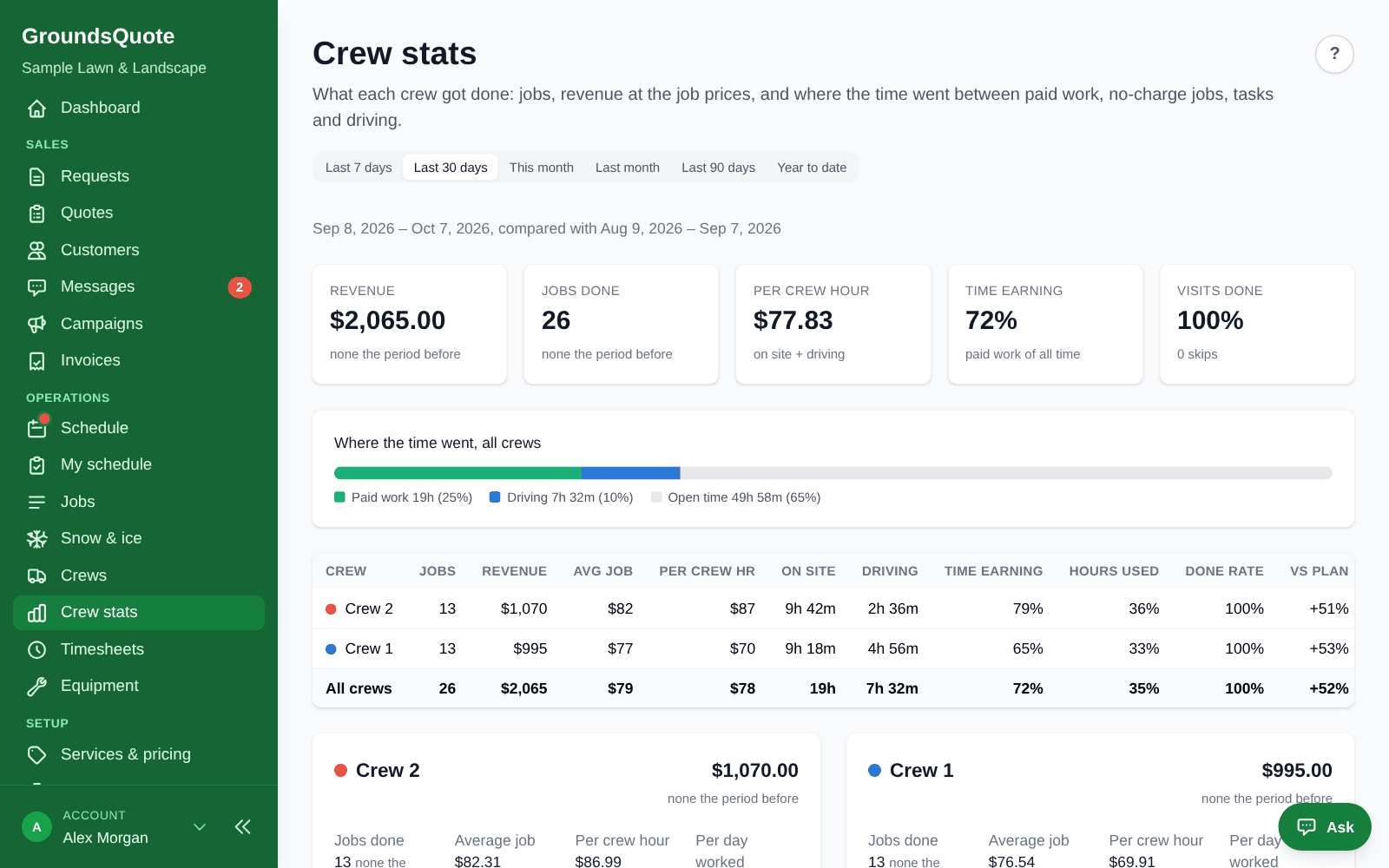
GroundsQuote already knows the price of every visit and when it started and finished. Crew stats turn that into revenue per crew hour, and labor costs turn it into a margin per job.
- Revenue per crew hour: On site plus driving, per crew, with the change against the period before.
- Where the time went: Paid work, no-charge work, tasks, driving and open time, per crew.
- Jobs running long: Jobs, crews and services that keep taking longer or shorter than planned, with the time to use instead.
Integrations
Works with the tools you already use
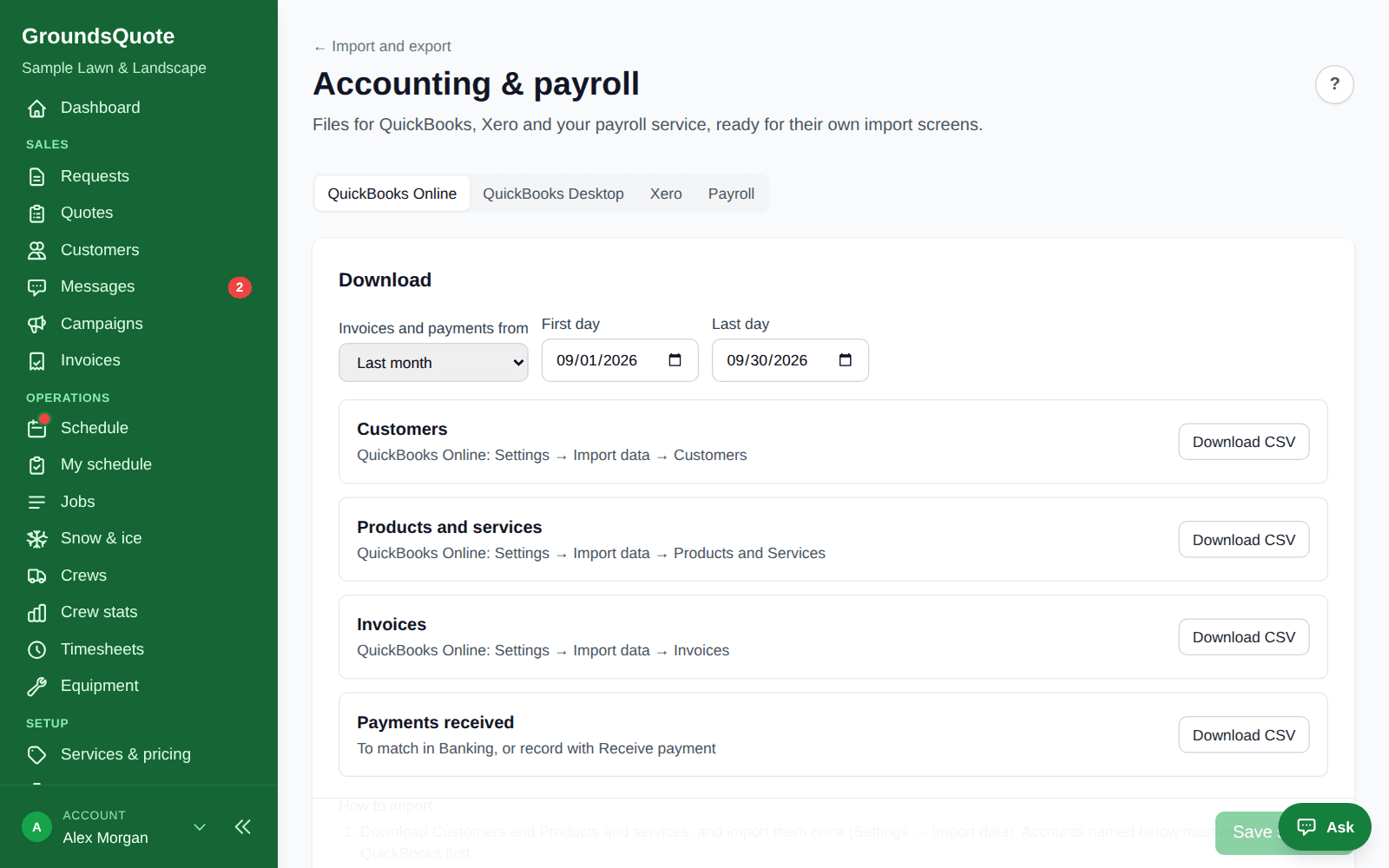
Files laid out for QuickBooks, Xero and your payroll provider’s own import screens, calendars that stay up to date, and an API and Zapier app for everything else.
- QuickBooks and Xero: Customers, items, invoices and payments for QuickBooks Online, an IIF file for QuickBooks Desktop, and Xero contacts and invoices.
- Payroll: Regular and overtime hours from timesheets for Gusto, ADP, Paychex and QuickBooks Payroll.
- Calendars: Each crew member’s schedule in Google, Apple or Outlook Calendar, updated hourly.
Why we built GroundsQuote
I got my start mowing lawns with my brothers for spending money through high school and college. After that I worked in landscaping professionally, first on a crew and then running crews and managing the people on them.
I eventually moved on to a different career, but I never really left the industry. I kept noticing the same things: quotes that took a drive and a measuring wheel, schedules kept on whiteboards, invoices that went out late. I always wanted to fix them.
So I built GroundsQuote for friends and former colleagues who still run lawn and landscape companies, to take the busywork off their plates. Now I am opening it up to every company that wants to quote faster, run a tighter schedule and grow.
Chad · Founder, GroundsQuote
More about usQuestions
How do I measure a commercial site?
Open the property’s snow site map and draw the paved areas, walkways, snow pile zones and hazards (curbs, islands, drains, hydrants, speed bumps, light poles, gates, fire lanes and no-plow areas) on the satellite map. Tap a lot to fill it from the aerial photo, add the sidewalks found in OpenStreetMap, or reuse the driveway from the lawn map. Overlapping areas are counted once, and hazards are numbered on the crew’s map.
What do commercial services cost to start with?
New accounts start with suggested prices you can change: Commercial Plowing at $3.50 per 1,000 sq ft of pavement ($95 minimum, with depth steps), Commercial Salting & De-icing at $2.50 per 1,000 sq ft plus $0.10 a foot of walkway ($75 minimum), and Commercial Sidewalk Shoveling at $0.15 a foot of walkway ($60 minimum, with depth steps). Every price, minimum and depth step is yours to set, per service or per quote. Setup asks whether your customers are residential, commercial or both, and switches on the matching snow services.
Can a commercial customer get a price on our website?
No. Snow priced by lot size is always quoted by your office from the site map, never estimated on Instant Quote. Instant Quote can show commercial callers your phone number instead (“Commercial property? Call us for a quote”), while homeowners still get driveway estimates.
What does the crew see at the site?
On the storm visit in My schedule: the service level (zero tolerance or a 1, 2 or 3 inch trigger), the site’s open hours, the on-site contact with a call button, your instructions and the site map with its numbered hazards.
How are pushes billed?
Per push, or one charge per storm however many passes it takes. Each push is priced from the snowfall measured at the weather station nearest the site, and the invoice line names the station. Salt and materials logged by the crew are billed at your price per bag or unit and taken off your stock.
What records do I have for a slip-and-fall claim?
A storm report per property per storm: each visit’s arrival and finish times, the crew and people, where the phone was, the weather at start and finish, the measured snowfall, materials and photos. Download it as a PDF, have it emailed after each storm, and the customer can download it from their portal.
Can I see where the trucks are on storm night?
The storm board shows each crew’s stops done and left, how far behind it is, its expected finish, sites that will miss their clear-by time, and crew positions while My schedule is open on their phones. Tracking with the app closed is not available yet.
Can I use subcontractors?
Yes. Each subcontractor works as their own crew on free field logins, with their insurance certificate and an expiry warning 30 days ahead. When a storm is coming they get an email with Yes / No buttons, and you approve a pay statement per storm, calculated per push, per site or by the hour.
Which plan do I need?
Snow and ice, site maps, the storm board, storm reports, salt logging and subcontractors are on Pro ($129 a month). Business ($249) adds labor costs and storm profit after labor, branches that each run their own storms, and the API, webhooks and Zapier.
Run your whole season from one app
Start free with quotes that measure the lawn from the address. Add scheduling, crews and invoicing when you are ready.
Free forever plan, no card · 30-day free trial on paid plans · Cancel anytime