
Crew app
Everything the crew needs, nothing they don’t
Crews open My schedule on their phone and see the next stop with big Navigate and Call buttons, the gate code and the dog’s name. One tap for On my way, Start job and Finish job. No prices, ever.
The crew app is on every plan, Free included; time tracking and timesheets on Pro and Business. Crew logins are free and never count as seats.
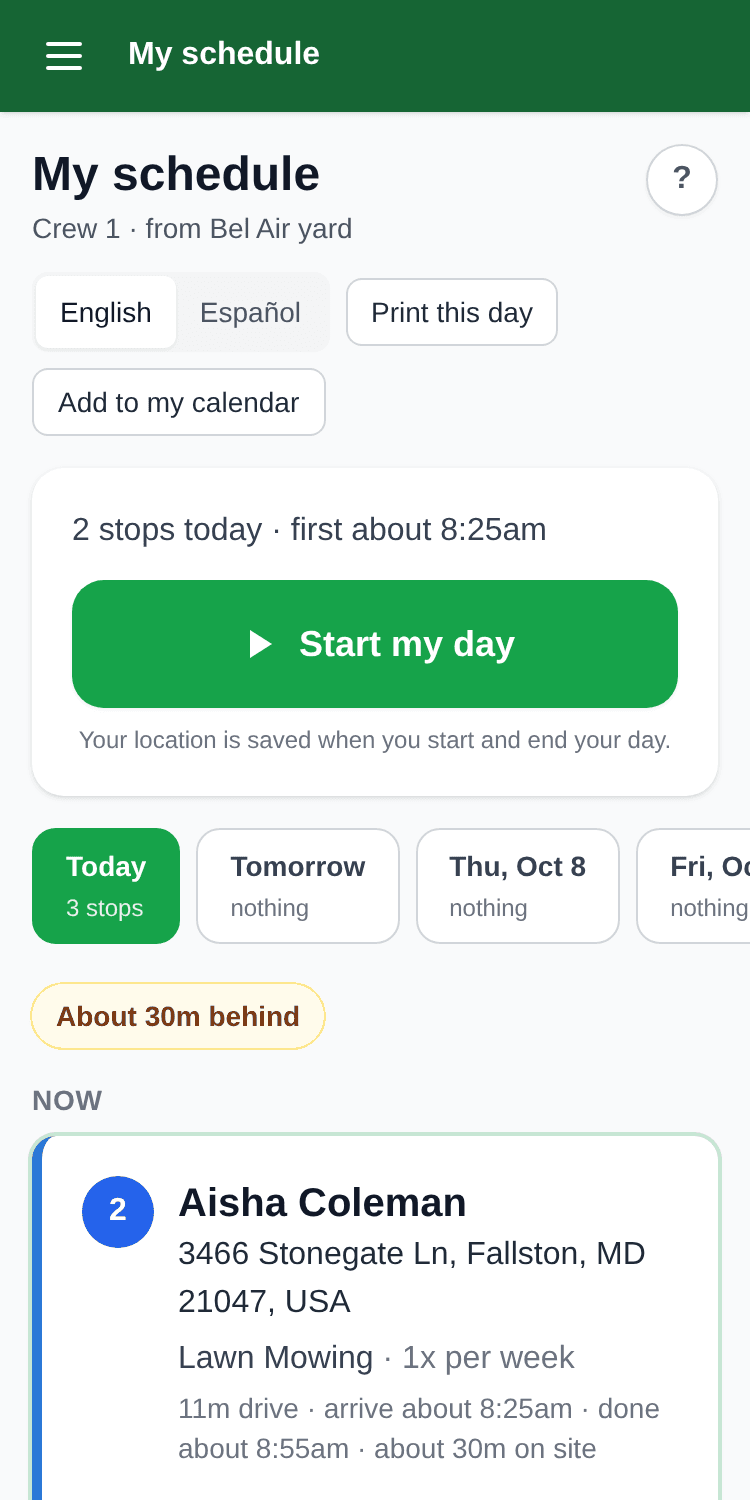
The next stop, front and center
Address, service, the property’s crew notes and the job’s notes, with Navigate into the phone’s maps app.
Photos and checklists
Before and after photos from the camera, a checklist per service, a note for the customer. You can require photos to finish a job.
“Done today” emails
Finishing a job emails the customer with the crew’s note and photos. Spanish notes are translated to English for the customer.
Start my day, End my day
Time on the clock and breaks, with where each stretch started and ended, for payroll and Timesheets.
Ahead or behind
The crew and the office see “About 40 minutes behind” and arrival times that move with the day.
Report a problem
Flat tire or a mower that won’t start: the crew reports it with photos and the office is emailed at once.
Your own job forms
Lawn conditions observed, an irrigation check or a walk-through: build forms with yes / no, choices, ratings and notes, and the crew fills them in before Finish job. Answers you mark go to the customer in the done email. On Pro and Business.
English or Spanish, per person
Each person chooses their own language. Notes typed in Spanish show in English for the office and the customer, and the other way around.
An app on their home screen
Crews install GroundsQuote straight from the browser on iPhone or Android, with no app store: it gets its own icon, opens full screen and goes straight to their schedule. With notifications on, the phone shows a notification when a job is added to or moved on their day. It updates by itself, so everyone is always on the latest version.
Keeps working with no signal
Rural properties and basements drop the signal. My schedule keeps the day on the phone, and every tap, note and photo is saved there and sent when the signal is back, with the time it was made, so job times and timesheets stay right.
Offers from the crew
From the job they are on, a crew can email the customer prices for services the property does not have yet. The customer chooses services and you get a request, or, if you allow it, an approved, booked job.
From a customer
“Keeping multiple crews organized used to be one of the biggest headaches of my day, especially when the weather changed our schedule. Now everyone can see their jobs on their phones, and moving things around is much easier. It’s been a big improvement for our day-to-day operations.”
Questions
Do crews need their own login?
Each person gets a field login, which only shows their own crew’s schedule and never a price. Field logins are free on every plan.
Is there an app to download?
Yes. GroundsQuote installs from the phone’s browser on iPhone and Android (Add to Home Screen, or Install app in Chrome) and then opens from its own icon like any app. It is not in the App Store or Google Play yet; installing from the browser gives the same app, notifications included.
Can crews and the office get notifications?
Yes. Each person turns on notifications on their own phone or computer and chooses what they hear about: crews get changes to their day; the office gets new requests, customer replies, quote answers, payments, equipment problems and customer requests, plus alerts when a crew has not started its day, falls behind its plan or a job runs well past its planned time, and crews and the office can be told when a break runs long, when someone is clocked in with no job under way (after the drive to the next stop) or is still on the clock after the crew’s end of day. While My schedule is open, the phone also asks to start a job on arrival at the property and to finish it on driving away. On iPhone notifications work in the installed app.
Does it work offline?
My schedule does. Each crew member’s stops for today and tomorrow are kept on their phone, so the day still shows with no signal, and On my way, Start, Finish, skips, notes, photos, chemical records and clocking in and out are saved on the phone and sent, with the time they were tapped, when the signal returns. The office screens, quotes and invoices need a connection.
Works hand in hand with
Scheduling & routes
Recurring jobs from accepted quotes, crews, a drag-and-drop calendar and optimized routes.
Crew stats & job profit
Revenue per crew hour, time on site against plan, labor costs and margin by job, crew and customer.
Chemical records & field tools
Application records for fertilizer and pesticide jobs, applicator licenses, spray conditions and a fertilizer calculator.
Free forever plan, no card · 30-day free trial on paid plans · Cancel anytime
Run your whole season from one app
Start free with quotes that measure the lawn from the address. Add scheduling, crews and invoicing when you are ready.
Free forever plan, no card · 30-day free trial on paid plans · Cancel anytime